




- Anwendungsbereich: professionelles ArbeitenDesktopEnterprisePC/NotebookPerformanceWindows, 7 Tasten
- Anschlussart: kabellose Mauskabellose Tastatur, Technologie: Logi BoltBluetooth, Reichweite: N/Am
- Sensortechnologie: Darkfield Laser Tracking, Auflösung: 8000 dpi
- Farbe: Dunkelgrau,
- Tastaturlayout: Deutsch


- Hot-Swap-fähige ROG HFX V2 Magnetschalter
- Tri-Mode-Konnektivität: Verbindung von bis zu 5 Geräten
- 8000 Hz Abtastrate (Polling rate)
- Sechsschichtige Dämpfung, Hochwertiger Metallrahmen
- 96%-Formfaktor
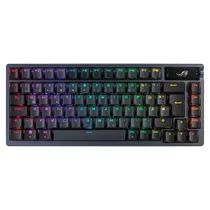
- Keyboard for Gaming, multicoloured illumination, Connection via 2.4 GHz Funk, Bluetooth, USB
- Layout: German (QWERTZ)
- mechanical (ASUS ROG NX Red Switches)
- Programmable Keys, ergonomic design, Switches wechselbar, OLED Display, Drehregler für Lautstärke


- kabelgebundene Tastatur
- Hot-swap-fähiger Nummernblock und Media Dock
- Tastaturlayout: Deutsch
- Farbe: Schwarz, Gewicht: 1590g; Höhe: 52mm; Breite: 546mm; Tiefe: 256mm
- 8 konfigurierbare Display-Tasten


- kein Nummernblock
- Kabellos, Bluetooth
- Layout: deutsch
- silber, 239g, 10,9 mm x 278 mm x 115 mm (H x B x T)
- Mac OS X 10.12

- Anwendungsbereich: professionelles ArbeitenDesktopEnterprisePC/NotebookPerformanceWindows, 7 Tasten
- Anschlussart: kabellose Mauskabellose Tastatur, Technologie: Logi BoltBluetooth, Reichweite: N/Am
- Sensortechnologie: Darkfield Laser Tracking, Auflösung: 8000 dpi
- Farbe: Weiß,
- Tastaturlayout: Deutsch

- Anwendungsbereich: Gaming, kein Nummernblock
- Nutzung mit & ohne Kabel
- Layout: deutsch
- schwarz, 40,0 mm x 326 mm x 136 mm (H x B x T)
- Windows 11, Windows 10, PC/ Notebook

- Anwendungsbereich: professionelles Arbeiten,
- Anschlussart: kabellos, Technologie: Logi Bolt, Reichweite: N/Am
- Tastaturlayout: Deutsch
- Farbe: Dunkelgrau, Gewicht: 690g; Höhe: 23.1mm; Breite: 433mm; Tiefe: 134mm

- Anwendungsbereich: Unterwegs,
- Anschlussart: kabellos, Technologie: , Reichweite: N/Am
- Tastaturlayout: Deutsch
- Farbe: Schwarz, Gewicht: 0g; Höhe: mm; Breite: mm; Tiefe: mm
- Passend für Apple iPad Pro 13" mit M4 (7. Gen / Early 2024)

- Anwendungsbereich: ,
- Anschlussart: kabellos, Technologie: , Reichweite: N/Am
- Tastaturlayout: Deutsch
- Farbe: Silber, Gewicht: 369g; Höhe: 1.09mm; Breite: 418.7mm; Tiefe: 114.9mm

- kein Nummernblock
- Kabellos, Bluetooth
- Layout: deutsch
- silber, 239g, 10,9 mm x 278 mm x 115 mm (H x B x T)
- Mac OS X 10.12

- kabelgebundene Tastatur
- Hot-swap-fähiger Nummernblock und Media Dock
- Tastaturlayout: Deutsch
- Farbe: Schwarz, Gewicht: 1590g; Höhe: 52mm; Breite: 546mm; Tiefe: 256mm
- 8 konfigurierbare Display-Tasten

- Tastatur für Multimedia, Office, Anschluss per Bluetooth
- Layout: Deutsch (QWERTZ) mit festem Nummernblock
- Flache Tasten
- Multimedia-Tasten
- Abnehmbare Handgelenkauflage
- inkl. Maus (Laser / kabellos)

- Anwendungsbereich: ,
- Anschlussart: kabellos, Technologie: , Reichweite: N/Am
- Tastaturlayout: Deutsch
- Farbe: Schwarz, Gewicht: 369g; Höhe: 1.09mm; Breite: 418.7mm; Tiefe: 114.9mm

- Anwendungsbereich: professionelles ArbeitenDesktopEnterprisePC/NotebookPerformanceMac, 7 Tasten
- Anschlussart: kabellose Mauskabellose Tastatur, Technologie: Bluetooth, Reichweite: N/Am
- Sensortechnologie: Darkfield Laser Tracking, Auflösung: 8000 dpi
- Farbe: Schwarz,
- Tastaturlayout:

- Anwendungsbereich: Gaming,
- Anschlussart: kabelgebundenkabellos, Technologie: BluetoothFunk, Reichweite: N/Am
- Tastaturlayout: Deutsch
- Farbe: Schwarz, Gewicht: 0g; Höhe: 40.0mm; Breite: 326mm; Tiefe: 136mm

- Beleuchtete Tasten und ein Scherenmechanismus mit 1 mm Tastenhub
- Gemacht für Multi-Touch Gesten und den Cursor in iPadOS
- Stufenlos den perfekten Betrachtungswinkel einstellen
- USB-C Anschluss zum Laden des iPad Pro
- Layout: deutsch

- Keyboard for Office, Connection via USB
- Layout: German (QWERTZ) mit festem Nummernblock
- Slim Keycaps
- Fest wrist rest

- Anwendungsbereich: Unterwegs,
- Anschlussart: kabellos, Technologie: , Reichweite: N/Am
- Tastaturlayout: Deutsch
- Farbe: Schwarz, Gewicht: 0g; Höhe: mm; Breite: mm; Tiefe: mm
- Passend für Apple iPad Air 13" mit M2 (6. Gen / Early 2024) +2 weitere Serien

- Keyboard for Multimedia, Office, Connection via 2.4 GHz Funk
- Layout: German (QWERTZ)
- Slim Keycaps
- ergonomic design, Integrated touchpad
- ...
A good keyboard shapes how comfortably you type, work and play every single day. At computeruniverse you will find keyboards for every purpose: quiet office keyboards for open-plan offices, ergonomic models for heavy typists, wireless Bluetooth keyboards for laptops, tablets and smart TVs, and mechanical gaming keyboards with Hall effect switches and Rapid Trigger. This guide explains keyboard types, form factors, connection options and layouts, lists realistic price ranges (as of 2026) and helps you avoid common mistakes – such as ordering a German QWERTZ keyboard when you actually need a UK or US layout.
- Which keyboard is right for me?
- Keyboard types: membrane, scissor switch, mechanical and Hall effect
- Form factors and sizes: from full-size to 60 percent
- Wired, wireless or Bluetooth?
- Keyboard layout: QWERTZ, QWERTY or AZERTY?
- What to look for when buying a keyboard
- Keyboard brands at a glance
- How much does a good keyboard cost?
- Why buy at computeruniverse?
- FAQ: keyboards – frequently asked questions
The right keyboard depends above all on how you use it: in the office, a quiet keystroke and comfort matter most; for gaming, response time and precision; on the go, low weight and a wireless connection. Once you know what the keyboard is mainly for, the choice quickly narrows down to a handful of suitable models.
Office and home office
Low-profile keyboards with scissor switches or quiet membrane keys, a full numeric keypad and a stable wireless connection are ideal for the office and home office. Multi-device models that switch between desktop PC, laptop and tablet at the press of a key are especially practical. If you often work in dim light, a backlit keyboard with a proximity sensor makes typing noticeably easier.
Heavy typists and ergonomics
If you type for several hours a day, an ergonomic keyboard is worth considering. Split or curved key layouts keep your wrists in a more natural position, and a palm rest provides additional support. Ergonomic keyboards usually take one to two weeks to get used to, but help prevent strain in the forearms and shoulders.
Gaming
For gaming, a mechanical or magnetic keyboard with N-key rollover, a high polling rate and programmable keys is the best choice. In competitive shooters such as Counter-Strike 2 or Valorant, Hall effect keyboards with adjustable actuation and Rapid Trigger offer a measurable advantage. You will find a wide selection among our gaming keyboards.
Laptop, tablet and smart TV
For mobile devices, compact Bluetooth keyboards without a numeric keypad are the best option, as they do not occupy a USB port and fit into any bag. For tablets, there is also the combination of protective cover and keyboard: a tablet case with keyboard turns your tablet into a compact work device.
The following table shows which keyboard features make sense for which use case.
| Use case | Recommended keyboard type | Form factor | Connection |
|---|---|---|---|
| Office / home office | Scissor switch or quiet membrane | Full-size with numeric keypad | Wireless (2.4 GHz) or Bluetooth, multi-device |
| Heavy typists | Ergonomic, also mechanical with quiet switches | Split or curved, with palm rest | Wired or wireless |
| Casual gaming | Mechanical with linear or tactile switches | Full-size or TKL | Wired or 2.4 GHz wireless |
| Competitive gaming | Hall effect with Rapid Trigger | TKL, 75 % or 60 % | Wired or 2.4 GHz wireless with high polling rate |
| Laptop / tablet / TV | Low-profile scissor switch | Compact without numeric keypad | Bluetooth |
The most important difference between keyboards is the technology beneath the keys, because it determines typing feel, noise, response time and price. In 2026, four types are common on the market.
- Membrane keyboard (rubber dome): a rubber dome closes a contact on a membrane sheet when pressed. Membrane keyboards are affordable, quiet and splash-resistant, but feel softer and less precise when typing.
- Scissor switch: a further development of the membrane with a stabilising scissor mechanism under each key. Key travel is short and the keystroke is even and quiet – typical of laptops and slim office keyboards.
- Mechanical keyboard: every key has its own switch with a spring and metal contact. Mechanical keyboards offer a precise, clearly defined typing feel and can be tailored to personal preference through different switch types.
- Hall effect keyboard (magnetic): a magnetic sensor continuously measures how far a key is pressed. This makes the actuation point adjustable, and the Rapid Trigger function registers the release instantly – an advantage for quick direction changes in games.
Mechanical switches: linear, tactile or clicky
Mechanical switches fall into three groups according to how they feel. Linear switches (often red) travel down smoothly without a noticeable bump and are popular with gamers. Tactile switches (often brown) provide a noticeable bump and suit heavy typists. Clicky switches (often blue) also produce an audible click and are unsuitable for shared offices. Silent variants dampen the keystroke considerably.
The table compares the four keyboard types by the most important buying criteria.
| Type | Typing feel | Noise | Ideal for |
|---|---|---|---|
| Membrane | soft, little feedback | quiet | occasional users, budget workstations |
| Scissor switch | flat, short travel, even | very quiet | office, home office, laptop users |
| Mechanical | precise; linear, tactile or clicky depending on switch | medium to loud (quieter with silent switches) | heavy typists, gaming, enthusiasts |
| Hall effect | linear, adjustable actuation | medium | competitive gaming, shooters |
A keyboard's form factor determines how many keys it has and how much desk space it needs. The more compact the keyboard, the more room is left for the mouse – on small layouts, missing keys such as arrow keys or F keys are reached via an Fn layer. If you work a lot with numbers, choose a full-size keyboard; if you game a lot, go for TKL or smaller.
The following overview shows common keyboard form factors with approximate width and typical use.
| Form factor | Keys (approx.) | Width (approx.) | What is missing | Suitable for |
|---|---|---|---|---|
| Full-size (100 %) | 104–105 | 44–46 cm | nothing | office, spreadsheets, accounting |
| 96 % / 1800 | 96–100 | 38–40 cm | gaps between key clusters | numeric keypad in less space |
| TKL (80 %) | 87–88 | 35–37 cm | numeric keypad | gaming, all-round use |
| 75 % | 81–84 | 31–33 cm | numeric keypad, reduced navigation cluster | compact setups with F keys |
| 65 % | 66–68 | 30–32 cm | numeric keypad, F-key row | gaming, mobile use |
| 60 % | 61–64 | 29–30 cm | numeric keypad, F keys, arrow keys | competitive gaming, minimalists |
A wired keyboard is the most reliable and lowest-latency solution, while a wireless keyboard keeps your desk tidy and gives you more flexibility. Modern wireless keyboards are now so fast that they have hardly any disadvantages, even for gaming.
- Cable (USB-A or USB-C): no battery, no dropouts, highest polling rate. Gaming models reach up to 8,000 Hz. Wired USB keyboards are also the most affordable option.
- Wireless with USB receiver (2.4 GHz): stable, fast connection with low latency, ideal for desktop PCs and gaming. The receiver does, however, occupy a USB port.
- Bluetooth: works without a receiver with laptops, tablets, smartphones and many smart TVs. Many Bluetooth keyboards store several devices and switch between them at the press of a key. Latency is slightly higher for fast-paced games.
- Tri-mode: cable, 2.4 GHz and Bluetooth in one keyboard – the most flexible solution if you use the same keyboard for your work and gaming PC.
With wireless keyboards, it is worth checking the power supply: office models with AA or AAA batteries often last many months, while backlit gaming keyboards with a rechargeable battery need to be connected to the USB-C cable after a few days to a few weeks, depending on brightness.
The right layout is the language layout you type in every day. As computeruniverse is a German retailer, many keyboards are offered with a German QWERTZ layout. Always check the product description for the layout designation such as "DE", "UK", "US" or "FR" before you order.
- QWERTY (US ANSI or UK ISO): standard for English. The US layout has a wide, single-row Enter key; the UK layout has an L-shaped Enter key and the £ symbol. Browse our QWERTY keyboards.
- QWERTZ (ISO DE): German layout with umlauts and ß; Y and Z are swapped compared with QWERTY. You will find these under QWERTZ keyboards.
- AZERTY: French and Belgian layout, useful if you mainly type in French.
For the Mac, there are keyboards with their own key assignment (Command and Option instead of Windows and Alt), for example the Apple keyboards. Many multi-device keyboards offer both assignments and switch between Windows, macOS, iPadOS and Android via a key combination.
Besides type, size, connection and layout, a few features decide whether a keyboard will satisfy you in the long run. Check these criteria before you buy:
Anti-ghosting and N-key rollover
Anti-ghosting ensures that several keys pressed at the same time are recognised correctly. Simple membrane keyboards often process only a few keys at once, while gaming models with N-key rollover register them all. For gaming and fast touch typing, anti-ghosting keyboards are therefore the safe choice.
Noise level
In open-plan offices, video calls or a shared study at night, a quiet keyboard is a must. Scissor switches and membrane keys are the quietest; on mechanical keyboards, silent switches, foam dampening in the case and O-rings under the keycaps help.
Keycaps: ABS or PBT
Keycaps made of PBT plastic are harder and do not develop a greasy shine even after years. ABS keycaps are cheaper but become smooth over time. Double-shot legends are moulded in and cannot wear off.
Hot-swap and customisation
Hot-swappable mechanical keyboards let you change switches without soldering. This means you can change the typing feel later or replace a faulty switch in seconds. In 2026, hot-swap is already standard on many mid-range models.
Lighting, software and extra keys
White backlighting makes typing in the dark easier, while RGB lighting is mainly a design feature – a large choice is available among our RGB keyboards. Manufacturer software allows macros, key assignments and profiles, ideally stored in the keyboard itself. Media keys, a volume wheel and a palm rest add everyday comfort.
The best-known keyboard manufacturers each have clear strengths that can guide your choice.
- Logitech: a broad range from affordable office keyboards and the MX series for productivity to gaming keyboards in the G series. View the Logitech keyboards.
- Cherry: German manufacturer and inventor of the MX switch, known for durable office, business and security keyboards as well as mechanical models. View the Cherry keyboards.
- Razer: gaming specialist with optical and analogue switches, strong software and extensive RGB lighting. View the Razer keyboards.
- Other brands: Corsair, SteelSeries, ASUS ROG, Keychron and Wooting stand for mechanical and Hall effect gaming keyboards; Microsoft, HP and Apple for slim office and system keyboards.
A good keyboard for office and everyday use starts at around 30 euros, a solid mechanical keyboard at around 60 euros. For Hall effect keyboards with Rapid Trigger or premium models with an aluminium case, budget 120 to 280 euros. Paying more mainly gets you better materials, wireless technology and more customisation options.
The table shows typical keyboard price ranges and what you can expect (guide prices, as of 2026).
| Price range | Typical keyboards | What you get |
|---|---|---|
| up to 30 euros | wired membrane keyboards, simple wireless sets | solid basic function for occasional users and second devices |
| 30 to 80 euros | slim office keyboards, Bluetooth models, entry-level mechanical | multi-device, partly backlit, first mechanical switches |
| 80 to 150 euros | premium office keyboards, mid-range mechanical | hot-swap, PBT keycaps, tri-mode, USB-C rechargeable battery, good software |
| from 150 euros | Hall effect gaming keyboards, enthusiast models | Rapid Trigger, adjustable actuation, up to 8,000 Hz, aluminium case |
At computeruniverse you will find keyboards of all types – from the affordable USB keyboard to the Hall effect gaming keyboard – and can filter the range by layout, connection, switch type and brand. This makes it easy to find a keyboard in exactly the language layout you need. Matching accessories such as mice and mouse pads can be ordered at the same time.
How long does a keyboard last?
A keyboard lasts many years with normal use. Manufacturers usually rate membrane keyboards at around 5 to 10 million keystrokes per key and mechanical switches at 50 to 100 million. Key legends, batteries and cables tend to wear out sooner than the technology itself. On hot-swap models, individual switches can be replaced cheaply.
Does a Windows keyboard work with a Mac?
Yes, any USB or Bluetooth keyboard basically works with a Mac. The Windows key then takes on the role of the Command key, and Alt that of the Option key. You can swap the assignment in the macOS system settings under "Keyboard". Some special keys and the manufacturer software only work under Windows.
Can I use a keyboard with a smart TV or games console?
Yes, most smart TVs as well as the PlayStation 5 and Xbox Series X|S recognise USB keyboards, and many TVs also support Bluetooth keyboards. This makes searching in streaming apps and chatting much easier. Whether special and media keys work depends on the device's operating system. Many console games do not support keyboard controls.
What should I do if liquid has been spilled on my keyboard?
Unplug the cable or switch off the keyboard immediately and remove the batteries. Turn the keyboard upside down so the liquid can drain and let it dry for at least 24 to 48 hours. After sugary drinks, remove the keycaps of mechanical keyboards and clean the affected areas with isopropyl alcohol.
How do I clean my keyboard properly?
The easiest way to remove crumbs is to tap the keyboard upside down or use compressed air; wipe surfaces with a slightly damp microfibre cloth. Isopropyl alcohol and cotton buds are suitable for disinfection, whereas harsh cleaning agents can damage the key legends. Always switch the keyboard off or unplug it before cleaning.
Are wireless keyboards safe from eavesdropping?
Modern wireless keyboards are considered safe if they encrypt the connection. Bluetooth keyboards encrypt by default; with 2.4 GHz wireless, look for AES encryption in the technical specifications. Authorities and companies with high security requirements still commonly use wired keyboards.
How do I dispose of an old keyboard?
An old keyboard is electronic waste and does not belong in household rubbish. In the EU, you can hand it in free of charge at a municipal recycling centre, and larger electronics retailers also take back small old devices. Remove batteries first and dispose of them separately. Working keyboards can also be donated or sold second-hand.
Text created: 06.10.2026